Gamer Chat theme
Fake Discord Chat Video Maker
Server drama, raid planning, and ratio'd replies — animated.
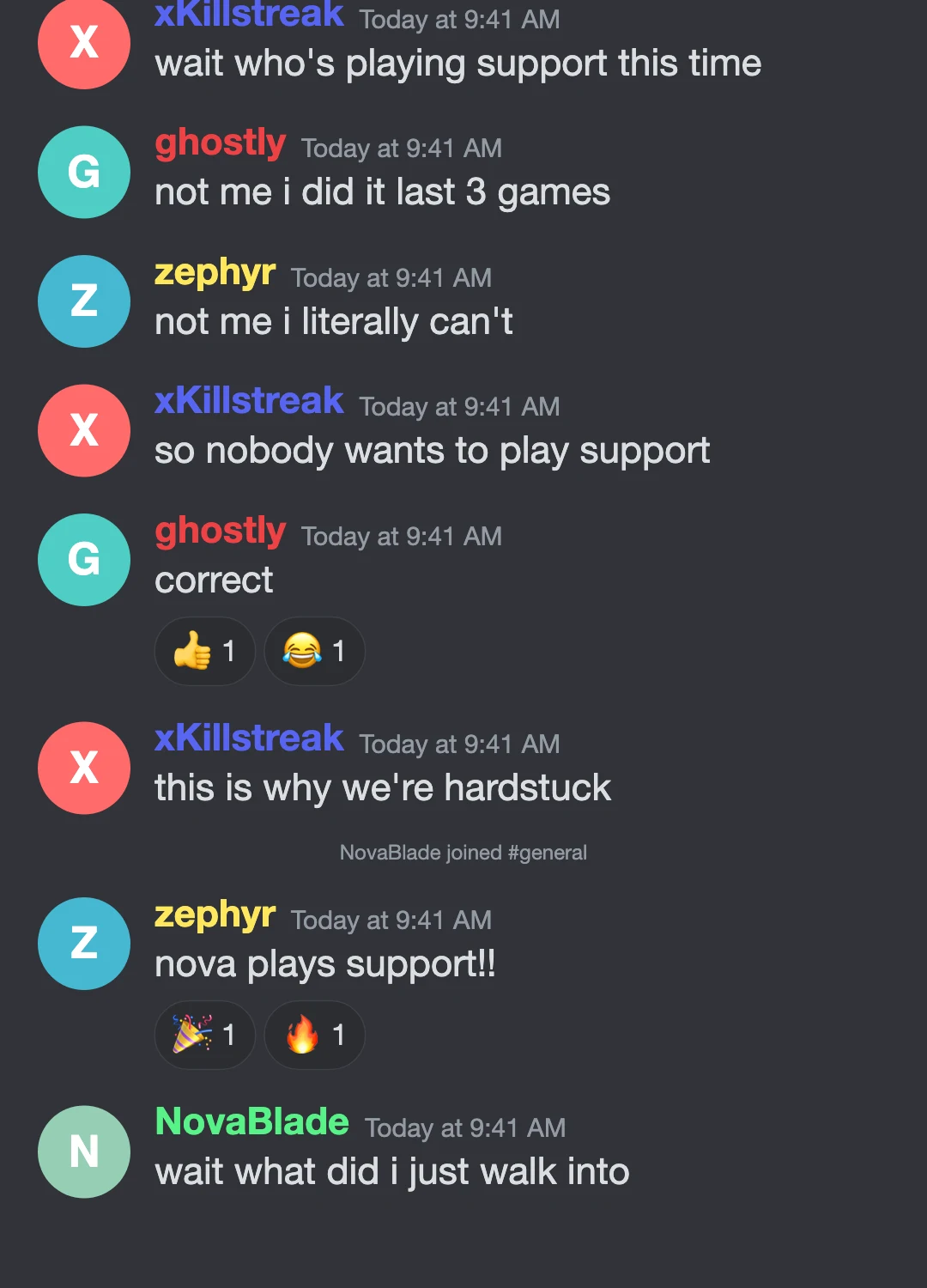
Create fake Discord-style chat videos with the dark server look gamers recognize instantly: colored usernames, reaction pills, member-joined events, and typing indicators pinned above the message bar. Write the drama, pick the channel name, export the video.
Free · No signup required · Exports MP4 for TikTok, Reels & Shorts
What you get with the Gamer Chat theme
- ✓Dark chat UI with colored usernames and channel header
- ✓Reaction pills with counts, member join/leave events
- ✓Large inline emoji and jumbo emoji-only messages, just like the real thing
- ✓Custom member avatars and name colors
Great for: Gaming skits, server drama reenactments, esports storytimes, and group chat chaos.
What a server thread needs that a phone thread does not
A Discord-style conversation is a room, not a line. That means colored usernames doing the work avatars do in a phone thread, reaction pills that accumulate counts under a message, member-joined and member-left events that mark who arrived when, and a typing indicator pinned above the message bar rather than floating in the stream. Without those, a server argument reads as two people texting; with them it reads as a crowd, which is usually the joke.
Making a fake Discord video rather than a screenshot
Server drama is paced. Someone posts, nothing happens, three people react at once, then the reply everyone was waiting for arrives. A still image flattens all of that into one frame. Here you control the gaps: how long the room sits silent, when the reactions land, which message gets a beat to itself. Emoji-only messages render jumbo the way the real client does, so the punchline keeps its size.
Gamer Chat theme — questions
- Can I make a fake Discord chat video?
- Yes. Write the conversation, choose the Gamer Chat theme, and export an MP4 with the dark server look — colored usernames, reaction pills, and member events included.
- Is there a fake Discord message generator here?
- This makes them as video rather than as a static image. You get the same recognizable dark chat interface, but animated: messages arriving on your timing, reactions landing after the fact, and typing indicators between them.
- Can I set custom usernames and name colors?
- Yes. Each member gets a name, a color, and an avatar, which is what makes a multi-person server thread readable at a glance.
- Does it work without a Discord account?
- Yes. Nothing connects to Discord — the theme is an original interpretation of the interface, rendered entirely in your browser.
Make more with Gamer Chat
More ways to make a texting video
Pick a chat look
Story formats
How-to guides
We use cookies to measure how the site is used and how well our ads work. Privacy Policy